HTML5 Input Type datetime is just like Input Type Date except it will allow visitor to select a date and time (with time zone).
You can call this datetime picker using input type="datetime" on your input field.This will certainly reduce your development time so need nasty Javascript code.
Currently the latest version of Chrome, Opera and Safari browser supporting this.
If you are using any of this above browser then you are lucky to see it on action
The code i used above is:
<form action="#">
 Date and time Picker: <input type="datetime" name="date_time" />
 <input type="submit" />
</form>
Or it may look like the screenshot below
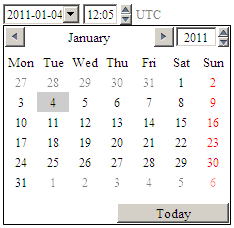 Image Source
Need Help with Your Digital Presence?
At Dynamic Web Lab, we specialize in building fast, scalable websites and applications for businesses across the UAE and beyond.
- View our case studies to see recent projects
- Explore our services — from WordPress to Next.js, AI solutions to mobile apps
- Contact us for a free consultation
Whether you need a WordPress website, a custom Next.js application, or AI-powered solutions, our team is ready to help.
Written by
Dynamic Web Lab Editorial
We share how we design, engineer, and scale digital products across the GCC, Europe, and the US.
Need help implementing this?
We turn these playbooks into shipped features. Let us scope your roadmap and support your team.
Start a project conversation